We promised screenshots — here they are.
We’re thrilled to give you your first real look at the Visual Block Painter, the admin interface at the heart of Project OC Prime’s new Rate & Template Management tools for Temporary Parking.
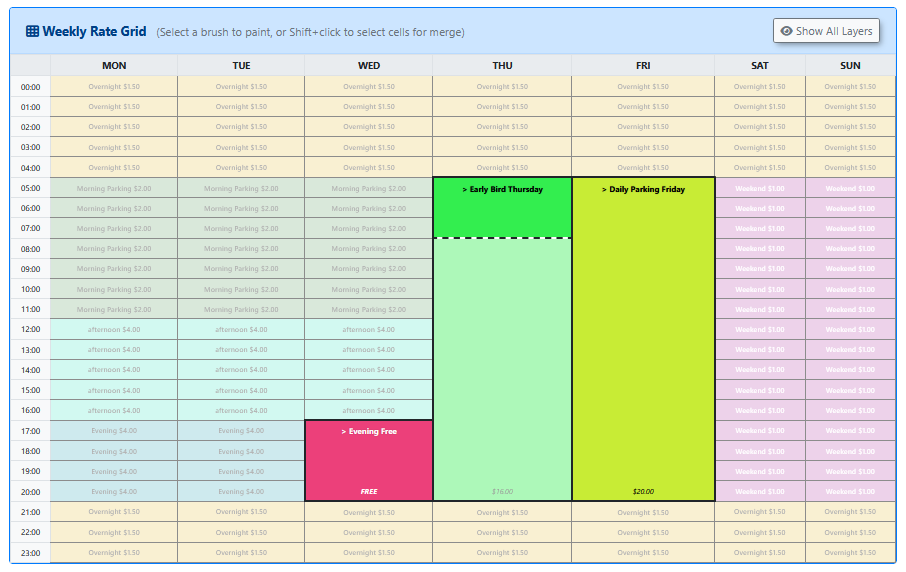
The concept is simple: instead of navigating complex configuration screens, admins paint their pricing directly onto a weekly grid. Select a time block, apply a rate, and merge hours into flat-rate zones with a click. Want to override standard pricing for an event or run a free evening promotion? Paint a higher-priority layer right on top.
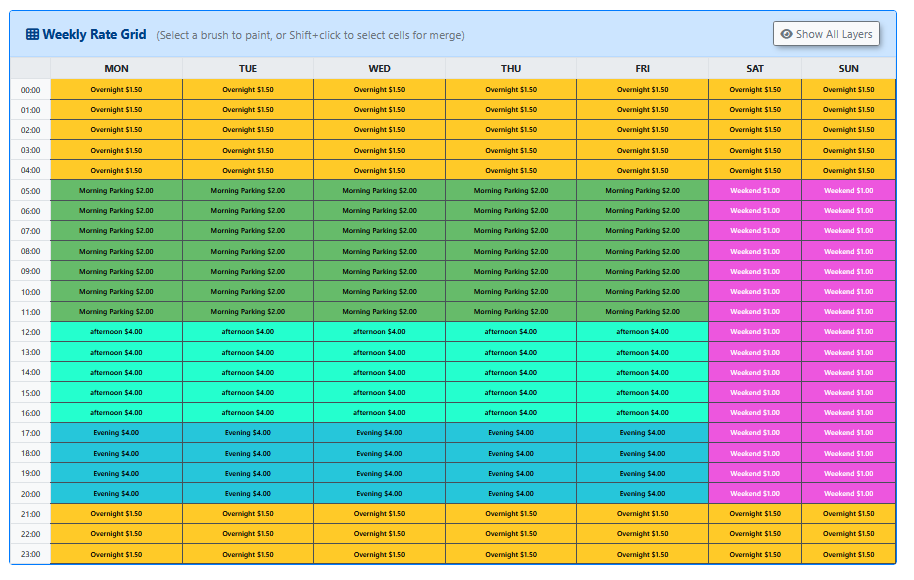
The two views below show the same interface in action:
- The Blocks view highlights merged flat-rate zones — Early Bird windows, Daily specials, and event overrides stand out at a glance.
- The Hourly view shows the full week colour-coded by period — Overnight, Morning, Afternoon, Evening, and Weekend — so admins can validate an entire template without drilling into individual cells.
Templates you build here are reusable — define a “Standard Downtown” rate once and assign it to multiple lots simultaneously.
On the development side, the team is currently finalizing the API between the Template Engine and Frontend, completing the UI/UX review of the new duration-slider and date-picker, and — importantly — cancelling legacy work on the old Flex Permitting system to keep things clean and modern.
We’re moving fast. Stay tuned for more updates as Phase 1 comes together, and drop your questions below — we’d love to hear what you’re thinking!